Your files, ready to use
A local 3D asset library for the assets you already own.
Kiosk Library is a desktop 3D asset manager for Windows. Browse models, PBR textures and HDRIs from your own folders, preview them visually, and send them into Blender, Houdini, Maya, Cinema 4D or Unreal Engine.
Your existing folders become the library. Local browsing works offline; you do not need to upload the collection or create an account to get started.
Download Kiosk FreeWindows 10 / 11 · Free edition · No subscription
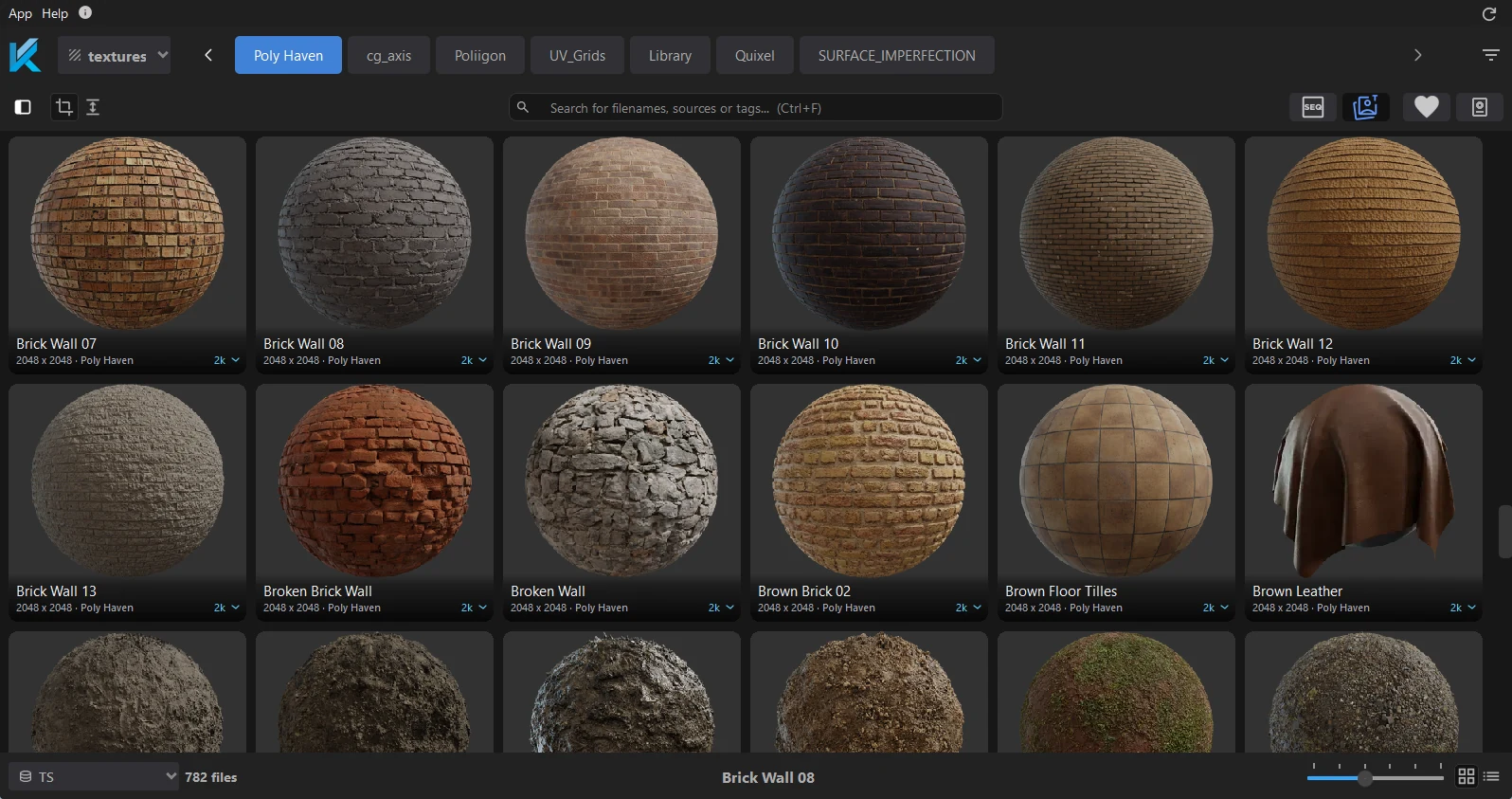
From scattered folders to a visual asset browser
A local library makes the models, materials and lighting you have collected reusable between projects. Kiosk indexes the folders you choose and adds thumbnails and filtering, so you can judge an asset before opening it in a scene.
- Add your folders as sources. Use the built-in Assets, Textures and HDRI categories. Each source has its own file filters.
- Browse previews and find a match. Use thumbnails, a 3D viewer and filters instead of opening files one by one.
- Send the asset into your scene. Install a companion plugin, start a live session, and export with the appropriate material setup for your renderer.
For the setup steps, see Getting started. For a folder structure you can maintain over time, read how to build a 3D asset library.
One library across five 3D applications
Keep the same collection when you change applications. Kiosk's plugins connect the local browser to your open scene; texture sets arrive as materials built for the supported renderer.
- Blender integration
Cycles and EEVEE
- Houdini integration
Karma, Arnold, Redshift, RenderMan and Mantra
- Maya integration
Arnold, Redshift, V-Ray and RenderMan
- Cinema 4D integration
Redshift and Octane
- Unreal Engine integration
OpenPBR master materials
Kiosk is a Windows application. It is useful for browsing and delivering assets across these applications; it does not replace your modeling software or a studio's production tracker.
Models, PBR textures and HDRIs in one place
Preview models, recognize sets of PBR maps, and reuse HDRIs without rebuilding the same setup by hand. Poly Haven is available inside Kiosk when you need to download an additional model, texture or environment map.
Start with the HDRI library guide, the PBR naming reference, or the guide to browsing downloaded Megascans locally.
Start free, expand when your library grows
The free edition includes the asset browser, automatic thumbnails, all five plugins and unlimited sources with up to 5,000 files per source. Manual Poly Haven downloads are limited to five per day.
Pro unlocks unlimited files per source, custom categories, multiple databases, extensions, scripting and shared libraries. Studio includes the same features for three seats. Both are one-time purchases covering the Kiosk 2.x release line.
See current pricing and the Free, Pro and Studio comparison. If you are choosing a browser, our 3D asset manager comparison explains the tradeoffs, including Kiosk's limits.
Optional AI access to your asset library
Kiosk's MCP integration lets a connected AI client search existing asset metadata and previews and deliver selected assets through configured DCC commands. Scene editing requires separate DCC tools. MCP is included with Pro and Studio, with an optional seven-day MCP-only trial in Free.
When you enable MCP, requested metadata and previews reach the AI client and may be processed by its provider. Read the MCP workflow and setup and limits before connecting.
Questions about local asset libraries
- What is a local 3D asset library?
- A local 3D asset library is a searchable collection of models, textures, HDRIs and other production files stored on your own drives. Kiosk adds previews, filtering and export into supported 3D applications to the folders you already use.
- Can I browse my library offline?
- Yes. Kiosk can browse and search local assets without an internet connection. Downloading Poly Haven assets, activating a paid license and connecting to an online AI provider require internet access.
- Is Kiosk a free 3D asset manager?
- Kiosk has a free edition with no account or time limit for ordinary library use. It includes all five DCC plugins, automatic thumbnails, unlimited sources with up to 5,000 files each, and five manual Poly Haven downloads per day. Pro and Studio unlock additional features.
- Which 3D applications does Kiosk support?
- Kiosk has companion plugins for Blender, Houdini, Maya, Cinema 4D and Unreal Engine on Windows. The plugin sends assets into a live session and builds materials for supported renderers.
- Does using Kiosk upload my asset library?
- Browsing a local library does not upload your files. If you enable the optional MCP integration, requested asset metadata and previews are sent to your chosen AI client and may be processed by its provider.